
“Is your work right for a business like mine?”
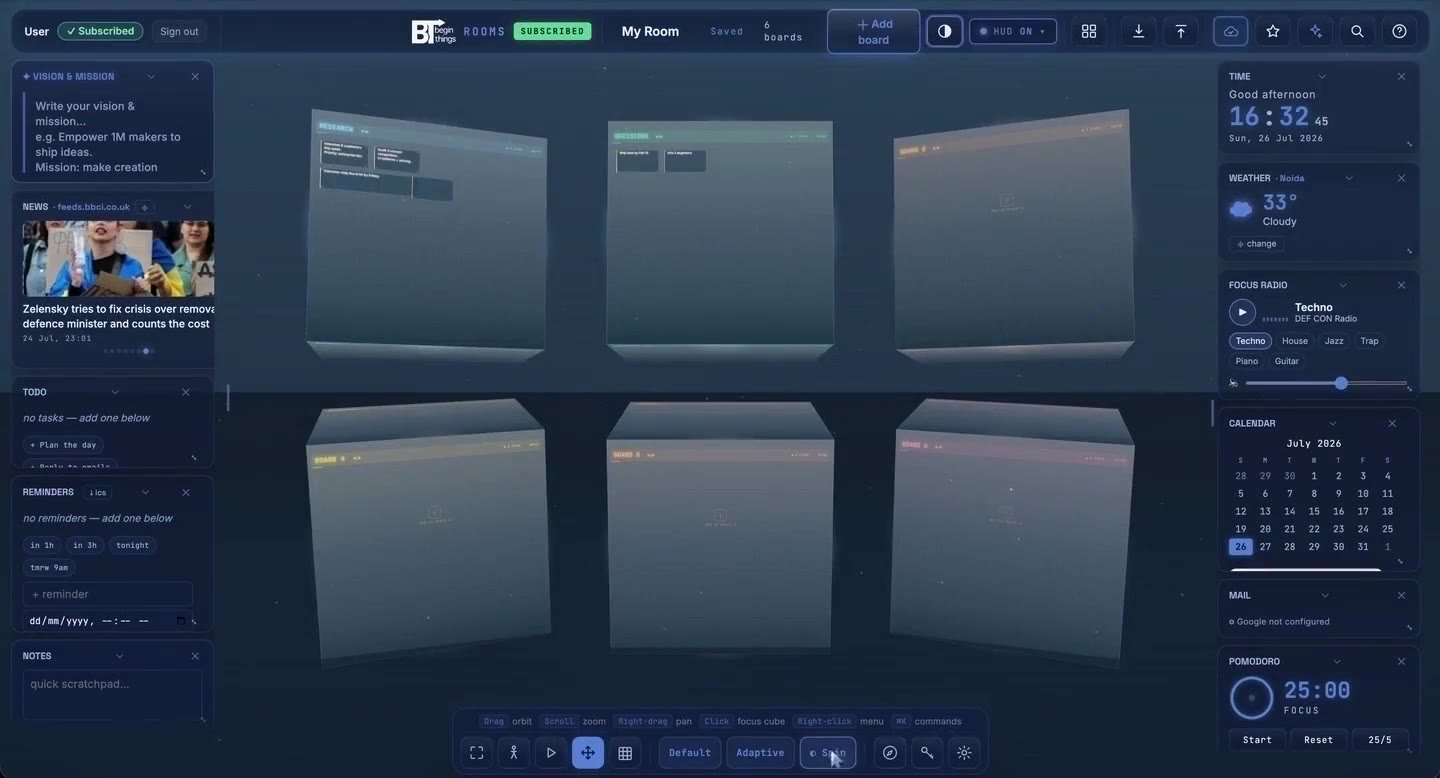
BeginRooms · 3D project workspace
Make room for
your whole idea.
One project. Six connected boards. Move from the first messy thought to a clear plan, with the context still beside it.
And everything around it.
THINK IN PROJECTS
Zoom out for perspective.
Open a board for the detail.
Keep the brief, research, plan and decisions around the same project. Rotate to what matters now; return to the bigger picture when you need it.
6zoomable boards
on every cube
on every cube
50project cubes
with active access
with active access
58templates
to start from
to start from
11days to try
the full workspace
the full workspace
SIX SIDES OF ONE PROJECT
Turn the idea around.
Explore a studio launch, one board at a time. These are example uses for your six faces; in your room, you decide what belongs on each.
PROJECT / STUDIO LAUNCHA clearer home
A clearer home
for our best work.
Launch a portfolio that helps the right clients understand what we do.
THE OUTCOMEA considered portfolio.
A simpler way to enquire.
A simpler way to enquire.
3 case studies1 clear offerFriday review
RESEARCH / FIND THE PATTERN01 / CUSTOMER QUESTION 02 / CONTENT NOTE 03 / DIRECTION
What should the story answer?
Lead with the problem. Show the work in context.
Put a useful case study beside the service it supports.
Illustrative research notes for this sample project.
PLAN / MOVE THE WORK FORWARD
A path from idea to launch.
Next
Choose the strongest three projects
Write the enquiry prompts
In progress
Shape the case study story
Build the project index
Ready
Agree the audience
Confirm the page list
Arrange notes into a workflow that fits your project.
ASSETS / KEEP CONTEXT WITH CONTENT
The pieces, in one place.
VISUAL DIRECTION
A little unexpected.
Clear. Spacious.
A little unexpected.
- DOCProject briefThe agreed starting point
- IMGSelected workImages for three case studies
- PDFPresentation notesContext for the walkthrough
Example file labels; no files are attached to this preview.
DECISIONS / LEAVE A TRAIL
Remember why, too.
- 01
Lead with the work
Open with a project that makes the offer tangible.
- 02
Keep the enquiry focused
Ask about the project, timeline and next step.
- 03
Show the thinking
Explain one useful decision in each case study.
DELIVERY / THE LAST USEFUL CHECK
Ready to put it in the world?
Try the sample checklist. Changes stay in this page until you reload.
1 of 4 sample steps complete
Illustrative boards · separate from your accountBuild your own room ↗
FROM THINKING TO SOMETHING USEFUL
Make progress.
Keep the context.
Start with a shape for the work.
Choose from 58 templates, or start with an empty board. Add sticky notes, text, drawing, shapes, tables and media as the idea develops.
Pick up where you left off.
Room content auto-saves to your account. Sign in elsewhere and load the same project, with the brief still beside the decisions.
Turn the board into the handoff.
Present the work in a walkthrough, or export it into a format you can use next: an image, document, deck or structured table.
PDFPNGPPTXDOCXMDCSV
YOUR ROOM, YOUR RHYTHM
Stay with
the work.
Put the useful things within reach. Set the mood without changing the project.
Try the full workspace ↗A little structure for focus
Keep a focus timer, tasks and calendar in view. Choose a HUD preset or arrange the widgets around your day.
Less reaching through menus
Search the command centre, jump to a board and move into presentation mode with keyboard controls.
An atmosphere that suits you
Choose from eight room themes. Your layout and visual preferences can stay tailored to each device.
AI, when you choose to connect it
The optional AI Hub uses a supported provider key or a compatible local model you configure. Provider costs and setup are separate.
ONE WORKSPACE. YOUR PACE.
Try it for 11 days.
Then choose your rhythm.
No card for the trial. No automatic charge when it ends. All four subscription options include the same workspace features.
Monthly
₹149
Billed every month
₹149 per month
Choose monthly3 months
₹399
Billed every 3 months
₹133 per month
Choose 3 months6 months
₹649
Billed every 6 months
About ₹108 per month
Choose 6 monthsYearly
Lowest monthly equivalent₹1,111
Billed every year
About ₹93 per month
Choose yearlyIncluded with every plan
- Up to 50 project cubes
- Six boards per cube
- All 58 templates
- Account save & sync
- Presentation & exports
- HUD, themes & AI Hub access
Prices shown in INR as checkout totals. Cancel a subscription and keep access through your paid period. AI provider usage, if configured, is separate.
Refund Policy · Terms · Data & Account Policy
Already have an account? Sign in ↗BEFORE YOU BEGIN
A little more clarity.
What is a room, a cube and a board?
The room is your 3D workspace. Each cube represents a project, and each of its six faces opens a large zoomable board. Use the boards for notes, drawings, plans, tables and media. Active trials and subscriptions support up to 50 project cubes.
How does the 11-day trial work?
Create an account to start 11 days of full access. No payment card is required, and the trial does not automatically become a paid subscription. Choose a plan when you are ready to continue.
What happens when my trial ends?
Workspace access pauses until you subscribe. Export the work you need while your trial or paid access is active. Account data is handled under the Data & Account Policy; ending a trial is not an automatic instruction to delete your boards.
Can I pick up my work on another computer?
Yes. Board and room content saves to your BeginThings account. Sign in to that same account on another device to load it. Theme and widget preferences can remain specific to each device. Account sync needs a working internet connection.
Can I export or present a project?
Use the workspace’s presentation and slideshow views to walk through your work. Board export options include PNG, PDF, PowerPoint, Word, Markdown and CSV, depending on the content and format. Exports require an active trial or subscription.
Is AI included in the subscription?
The optional AI Hub needs a supported provider key you supply or a compatible local model service you run. Provider charges, model availability and local setup requirements are separate. You can use the workspace without configuring AI.
Do I install an app, and can I cancel a plan?
BeginRooms runs in a browser, with the full spatial workspace intended for desktop and laptop use. No installation is required. You can cancel a subscription and keep access through the period already paid for. Billing and refunds follow the published policies.
YOUR NEXT GOOD MOVE
Give your next project a place to begin.
Open a room. Pick a board. Start with the idea you already have.